DMN Tester
You can integrate the DMN Tester in your project pretty simple.
Why
The DMN Tester lets you easily validate your DMNs, that you create or get from the business analysts.
The DMN Tester gives you a UI, to configure a test for a DMN. As there is already some information in your domain model, we must only define the rest. And so we can directly run the tests, without configure them manually in the UI.
The tester is part of orchescala (orchescala-dmntester-server): it brings the
DMN engine of Camunda 8 (dmn-scala), an http server and the UI - and runs in
the JVM of your project. No Docker, no image, no container.
Get Started
The DMN Tester DSL use the DMNs you created - in this context I refer to the Bpmn DSL
Let's start with a basic example:
// put your dmns in the dmn package of your project (main)
package orchescala.examples.invoice.dmn
// import the projects bpmns (DMNs)
import orchescala.examples.invoice.bpmn.*

object ProjectDmnTester extends CompanyDmnTester:

  override protected def dmnTesterObjects = Seq(
    InvoiceAssignApproverDMN
      .testValues(_.amount, 249, 250, 999, 1000, 1001)
      .dmnPath("invoiceBusinessDecisions"),
    // for demonstration - created unit test - acceptMissingRules just for demo
    InvoiceAssignApproverDmnUnit
      .acceptMissingRules
      .testUnit
      .dmnPath("invoiceBusinessDecisions")
      .inTestMode
  )

end ProjectDmnTesterRun the DMN Tester
In your sbt-console:
dmn/runMain mycompany.myproject.dmn.ProjectDmnTester
The following steps are done:
- The configurations are written to
03-dmn/src/main/resources/dmnConfigs. - The tester starts on
http://localhost:8883- in this JVM. - It keeps running until you stop it with Ctrl-C.
If the port is already taken by the tester of ANOTHER project, you are told
which one - give this project its own exposedPort then.
Check the results - and accept what is correct
Every input row of the result table has an OK checkbox; everything that
matched a rule without a problem is pre-checked. Save n Test Case(s) writes
those rows into the *.conf as testCases, so the evaluated outputs become
the expected outputs. From then on every run compares against them - a DMN
change that breaks a decision shows up red.
A decision that is tested with its required decisions (testUnit is not set)
shows one table per decision; only the main table is compared with your
expectations.
createDmnConfigs
A DSL to create the DMN Tester configurations.
You start from the DMN, that you defined, here an example:
  lazy val InvoiceAssignApproverDMN = collectEntries(
    in = SelectApproverGroup(),
    out = Seq(ApproverGroup.management),
  )
Now you can add the following:
.testValues
Define the input values for the DMN you want to test.
For the following types this is done automatically:
boolean->true&falseenum-> all values of this enumeration.
If an input attribute is optional (Option) it also will have a null as a test input.
That said, you only need to define the rest of your inputs, like
  InvoiceAssignApproverDMN
    .testValues(_.amount, 249, 250, 999, 1000, 1001)
It starts with the name of the input (_.amount) and is followed by all test values with the according type.
The underline in _.amount is the input of the DMN (for the coder: it is a function: In => DmnValueType).
This makes sure the compiler checks if there is such an attribute.
[error] -- [E008] Not Found Error: /Users/mpa/dev/Github/pme123/orchescala/examples/invoice/camunda7/src/main/scala/orchescala/examples/invoice/dmn/InvoiceDmnTesterConfigCreator.scala:27:20
[error] 27 |      .testValues(_.amounts, 249, 250, 999, 1000, 1001),
[error]    |                  ^^^^^^^^^
[error] |value amounts is not a member of orchescala.examples.invoice.domain.SelectApproverGroup - did you mean _$1.amount?Object Inputs
An input does not have to be a simple value - it may be an object, whose fields the DMN addresses:
  case class SelectedFond(id: Long, percentage: Int)

  case class In(selectedFond: SelectedFond)
  object In:
    lazy val example = In(SelectedFond(id = 11393215, percentage = 50))
The example of your DMN is the default test value - additional ones as usual:
  SelectedFondDmn.example
    .testValues(
      _.selectedFond,
      SelectedFond(id = 11393215, percentage = 10),
      SelectedFond(id = 11393215, percentage = 50)
    )
In the configuration each field keeps its type:
values=[
    {
        id=11393215
        percentage=50
    }
]
The DMN engine gets such a value as a FEEL Context - so the input expressions
of your table address the fields: selectedFond.id / selectedFond.percentage.
Objects may be nested and optional fields (Option) are the value itself or null.
Collections are not supported as an input value.
.testUnit
By default, a DMN Test is integrated - meaning that it will take all dependent inputs into account.
So if you have complex set of dependent DMN Tables you can test them separately, like:
.testUnit.dmnPath
To support different naming schemes, you can adjust the DMN file name the following way:
- Nothing to do, if the file name is
dmnBasePath / s"${decisionId.replace("mycompany-", "")}.dmn". (see configuration) -
The creation of the default path can be overridden:
protected def defaultDmnPath(dmnName: String): os.Path = dmnBasePath / s"$decisionId.dmn" -
A different name, but with the same defaultDmnPath:
.dmnPath("invoiceBusinessDecisions") -
An entirely different path (using os.Path):
.dmnPath(os.pwd / "mySpecial.dmn")
.acceptMissingRules
Sometimes you have a lot of rules that you don't want to test all.
Adding .acceptMissingRules will allow missing rules in your test.
.inTestMode
When you validated a test result, you can create Test Cases.
If you do so, you must add .inTestMode,
otherwise the configuration will be overridden, when running the DMN Tester the next time.
Variables
If you have dynamic content in your DMN (input or output), you need to add them as well.
To distinguish them from testing inputs, we wrap them in a DmnVariable class.
Camunda DMN Engine handles Variables and Test Inputs exactly the same.
We distinguish them, because Variables are not important for the matching process. So we do not need to have different values for them.
We recommend not to use dynamic values in inputs of rules. If you do the variable will rather be a test input.
Example:
  case class Input(letters: String = "A_dynamic_2",
                   inputVariable: DmnVariable[String] = DmnVariable("dynamic"),
                   outputVariable: DmnVariable[String] = DmnVariable("dynamicOut")
                  )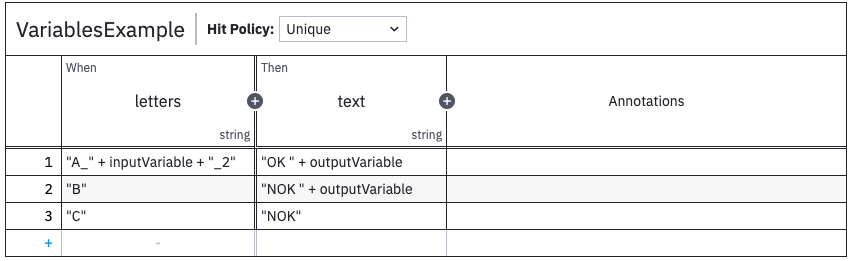
In this example the input must be A_dynamic_2 to match the first rule.
So it is a corner case if this is rather a test input.
The output variable can be whatever you want.
Be aware that you must run the DMN Tester again, whenever you made changes
(stop it with Ctrl-C and run dmn/runMain ...ProjectDmnTester again).
Configuration
See 03-dmn.
Problem Handling
The DMN Tester runs in the JVM of your project. So to find problems, you have:
- For the server: your sbt-console - it also prints which engine is used and where it looks for the configurations.
- For the client: the Browser Console
If you are stuck, or find a problem, please create an issue on Github.